

Description
Download EDI COMBO PLAYER APK – Free-to-Air TV and Radio App for Android
Overview
The EDI-COMBO PLAYER is a free-to-air television and radio application designed for Android devices. It enables users to access live TV and radio broadcasts through compatible tuners connected via USB. The app supports a range of devices including smart TVs, smartphones, and tablets, provided they run Android and have a USB port. Its primary purpose is to serve as a bridge between hardware tuners and the Android ecosystem, allowing users to watch and listen to free-to-air content without subscription fees.
Target users include individuals seeking an ad-free, cost-effective way to enjoy live broadcasts on mobile or home devices. The app is particularly useful for those who own or are using external tuners for over-the-air (OTA) reception. It streamlines the process of discovering, selecting, and monitoring available channels through an integrated channel status viewer. While the developer did not provide additional details about the company or technical background, the app’s focus on accessibility and compatibility with diverse hardware suggests a practical, user-driven design philosophy.
Real-world usage scenarios include watching live news, sports, or local broadcasts from a home entertainment system or on-the-go via a tablet. The app’s ability to handle up to 32 channels simultaneously allows for multitasking, such as monitoring multiple broadcasts at once. However, functionality is entirely dependent on the presence of a compatible tuner, which must be capable of receiving appropriate broadcast frequencies.
Key Features & Capabilities
- Multi-channel viewing support – The app allows users to watch up to 32 free-to-air channels simultaneously, enabling real-time monitoring of multiple broadcasts.
- Automatic tuner detection – Upon connection of a compatible USB tuner, the app scans the device and identifies it without requiring manual configuration.
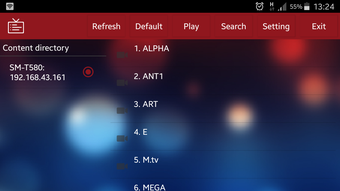
- Channel status viewer – A built-in tool provides real-time information on signal strength, channel availability, and tuning status for each broadcast.
- Universal device compatibility – Designed for use across smart TVs, smartphones, and tablets running Android with a USB port.
- Subscription-free access – The app does not require any paid subscriptions or recurring fees to use its core functionality.
- Scalable tuner support – Users can connect additional tuners to expand the number of available channels beyond the default limit.
These features make the app ideal for users who want to repurpose existing hardware, such as USB TV tuners, into a portable or home-based entertainment solution. For example, a user could connect a tuner to a tablet and watch live local news while traveling, or use it on a smart TV to access regional broadcasts without a cable provider. The app’s focus on hardware integration ensures that it remains lightweight and efficient, relying on external devices for signal processing rather than internal decoding.
User Interface, Workflow & Performance
The EDI-COMBO PLAYER features a clean, user-friendly interface designed to simplify navigation for both casual and technical users. The layout prioritizes channel visibility, with a main screen displaying a grid or list of available channels, each accompanied by a status indicator. This design enhances usability by allowing quick identification of active or weak signals.
Workflow efficiency is maintained through automated processes. Once a tuner is connected, the app initiates a scan and populates the channel list with detected broadcasts. Users can then select a channel for playback, with the status viewer providing real-time feedback. The interface is responsive, though specific performance data such as CPU or RAM usage were not provided by the developer.
Stability is expected to be consistent, given the app’s reliance on standard Android USB communication protocols. However, actual performance may vary depending on the connected tuner’s quality and the device’s hardware capabilities. The developer did not specify resource usage details, so users should expect standard Android app behavior in terms of background activity and battery consumption.
Compatibility & System Requirements
The EDI-COMBO PLAYER is designed for Android-based devices with a USB port. It is compatible with smart TVs, smartphones, and tablets running the Android operating system. The app’s version and installation size were not specified in the provided information.
Exact system requirements were not listed. Compatibility depends on the presence of a USB OTG (On-The-Go) function, which enables the device to act as a host for external peripherals like tuners. Users should verify that their device supports USB OTG, as this is essential for the app to function. The developer did not provide details about minimum Android version, processor architecture, or memory requirements.
Hardware requirements are limited to a compatible tuner capable of receiving free-to-air broadcast frequencies. The app itself does not include signal decoding or tuning logic, relying instead on the external tuner’s capabilities.
Pros and Cons
Pros
- Free-to-air access without subscription fees
- Supports up to 32 channels simultaneously
- Automatic detection of connected USB tuners
- Simple, intuitive interface for easy navigation
- Scalable with additional tuners for expanded channel access
Cons
- Requires a compatible external tuner to function
- Compatibility with specific tuners is not documented
- No information on minimum Android version or device requirements
- Performance and resource usage details not provided
- Dependent on external hardware for core functionality
FAQ Section
Is EDI COMBO PLAYER compatible with all Android devices?
The app is designed for Android devices with a USB port and USB OTG support. However, exact compatibility depends on the device’s hardware and software configuration. Users should verify that their device supports USB OTG before attempting to use the app.
Does the app require a subscription or payment?
No, EDI COMBO PLAYER is a free-to-air application and does not require any subscription or additional fees to access its core features.
Can I use multiple tuners with the app?
Yes, the app supports the use of multiple tuners. By connecting additional tuners via USB, users can expand the number of available channels beyond the default limit of 32.
Is the app safe to download and use?
The app is distributed as a free APK file. Users should ensure they download it from a trusted source to avoid potential security risks. The developer did not provide information on app permissions or security protocols.
Does the app work offline?
Yes, once a tuner is connected and channels are detected, the app can function without an internet connection. However, initial setup and tuner detection may require network access for updates or configuration.
Final Thoughts + CTA
The EDI-COMBO PLAYER presents a practical, no-cost solution for accessing free-to-air TV and radio broadcasts on Android devices. Its ability to detect and manage multiple tuners, combined with a straightforward interface, makes it a valuable tool for users seeking flexible, hardware-based entertainment options. While the app’s functionality is entirely dependent on external tuners, its design ensures seamless integration and ease of use.
It is best suited for tech-savvy individuals and hobbyists who already own or are willing to invest in compatible tuners. For those looking to cut the cord without sacrificing live content, this app offers a reliable and efficient path forward. The lack of subscription fees and the scalability of channel access further enhance its appeal.
Download EDI COMBO PLAYER now
Guides & Tutorials for EDI COMBO PLAYER APK
How to install EDI COMBO PLAYER APK
- Click the Preview / Download button above.
- Once redirected, accept the terms and click Install.
- Wait for the EDI COMBO PLAYER APK download to finish on your device.
How to use EDI COMBO PLAYER APK
This software is primarily used for its core features described above. Open the app after installation to explore its capabilities.
User Reviews for EDI COMBO PLAYER APK 0
No reviews found





